Flow Runner
Chain multi-step API journeys the same way your users live them. Pass data between steps, script the parts that repeat, retry the flaky ones, run dozens of iterations, and get a single clear report at the end. End-to-end coverage without a separate test framework.
Storyboard to Dashboard
Each step is a full request panel with Before All and After All hooks right in the sidebar. Hit Run and the same view turns into a clean dashboard with duration, success rate, response-time chart, and step breakdown. No log grepping.
Data Moves With the Flow
Extract any value from a response and drop it straight into the next step: URL, header, body, wherever. No manual copy-paste, no brittle hardcoded fixtures.
Import, Don't Retype
Drop steps straight in from your saved Box requests or the OpenAPI endpoints you designed in Projects. The APIs you built and the requests you kept are one click away from becoming a flow.
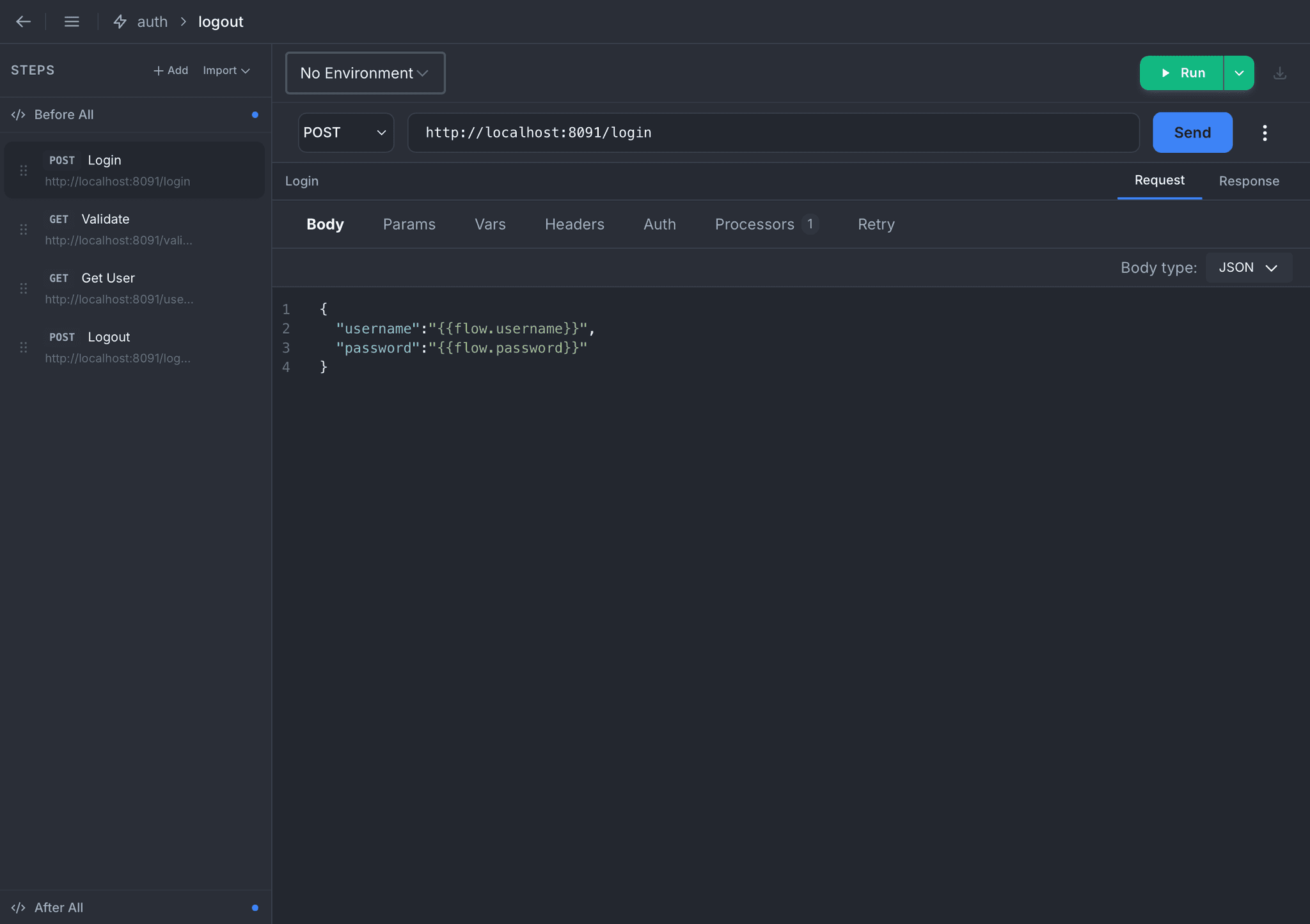
Step Editor
Build each step exactly like a single HTTP request: method, URL, body, params, headers, auth, variables. Reference anything the flow has already produced with the {{flow.*}} syntax. Every tab you already know from the request panel is right there, nothing new to learn.
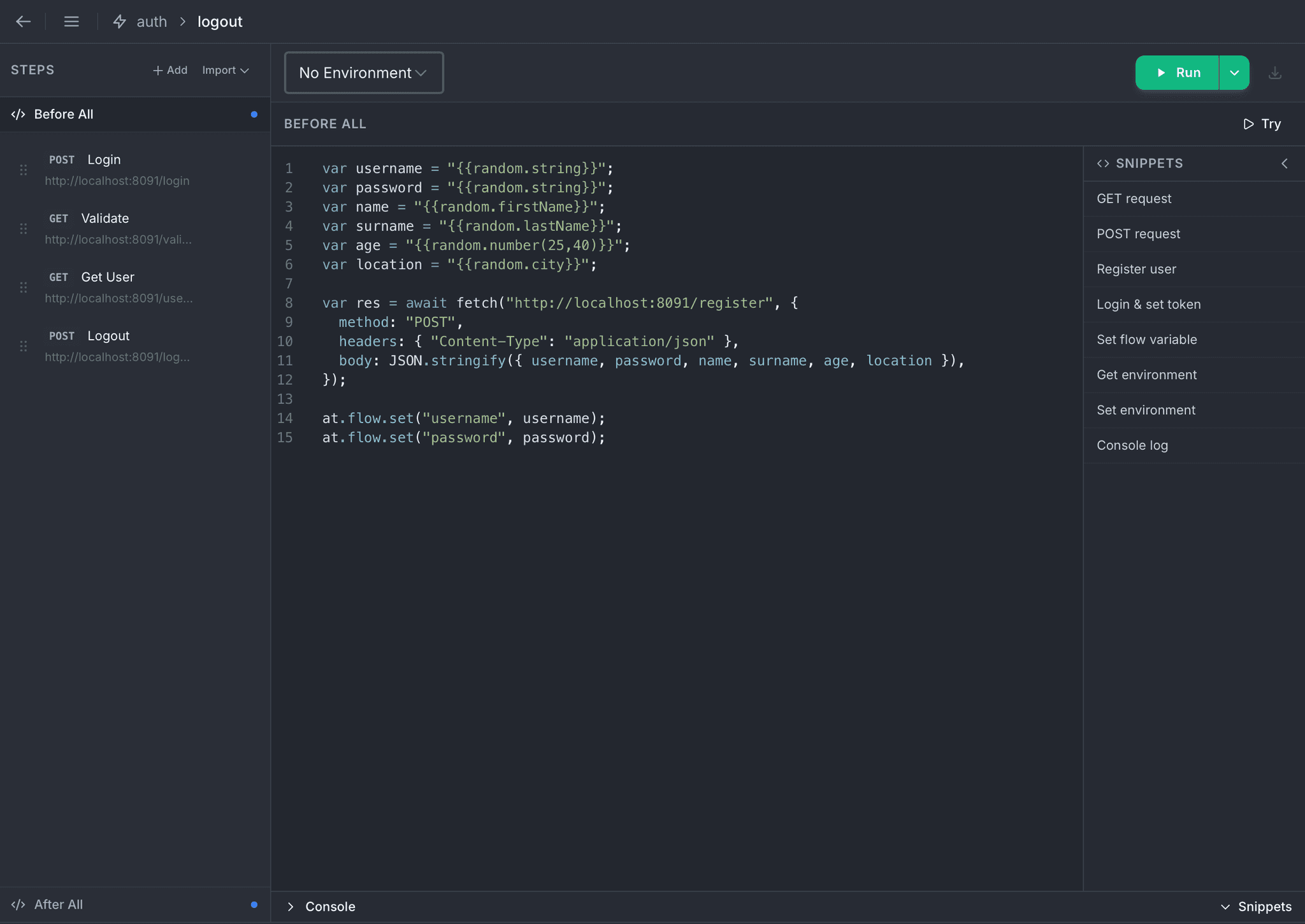
Before All
Prepare the ground before the first step runs. Register a fresh user, fetch a one-shot token, seed a database, or pre-compute values every step will consume. The script runs once, then its results are visible to the entire flow.
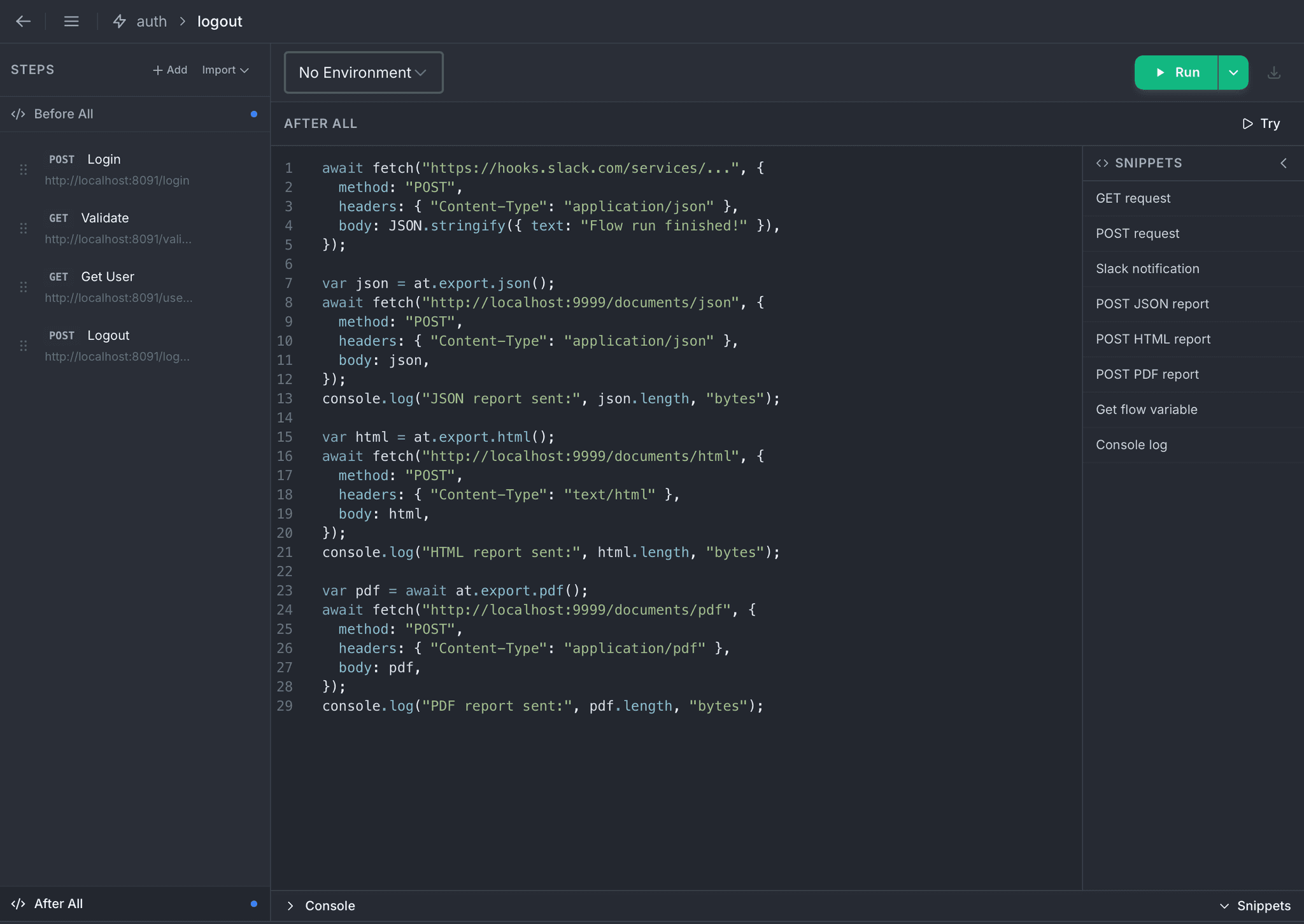
After All
Close the loop when the flow finishes. Export the full run as JSON, HTML, or PDF in a single call. Send a Slack summary, email a report, archive to storage, all from the same script and with no external runner.
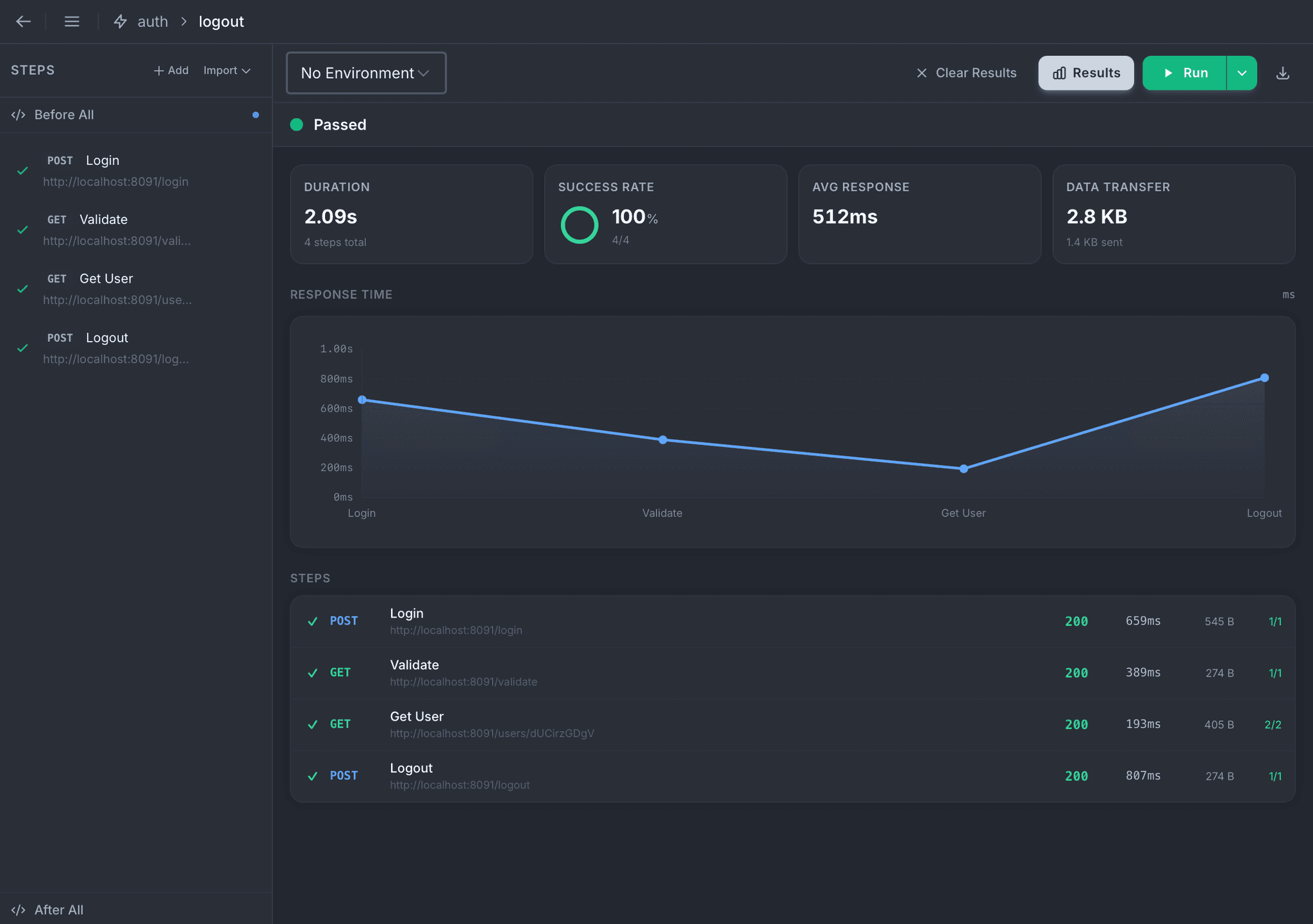
Run Results at a Glance
Every run lands in the same dashboard: duration, success rate, average response time, data transfer, and a response-time chart across the steps. Click any step to see its request, response, assertions, and script output inline.
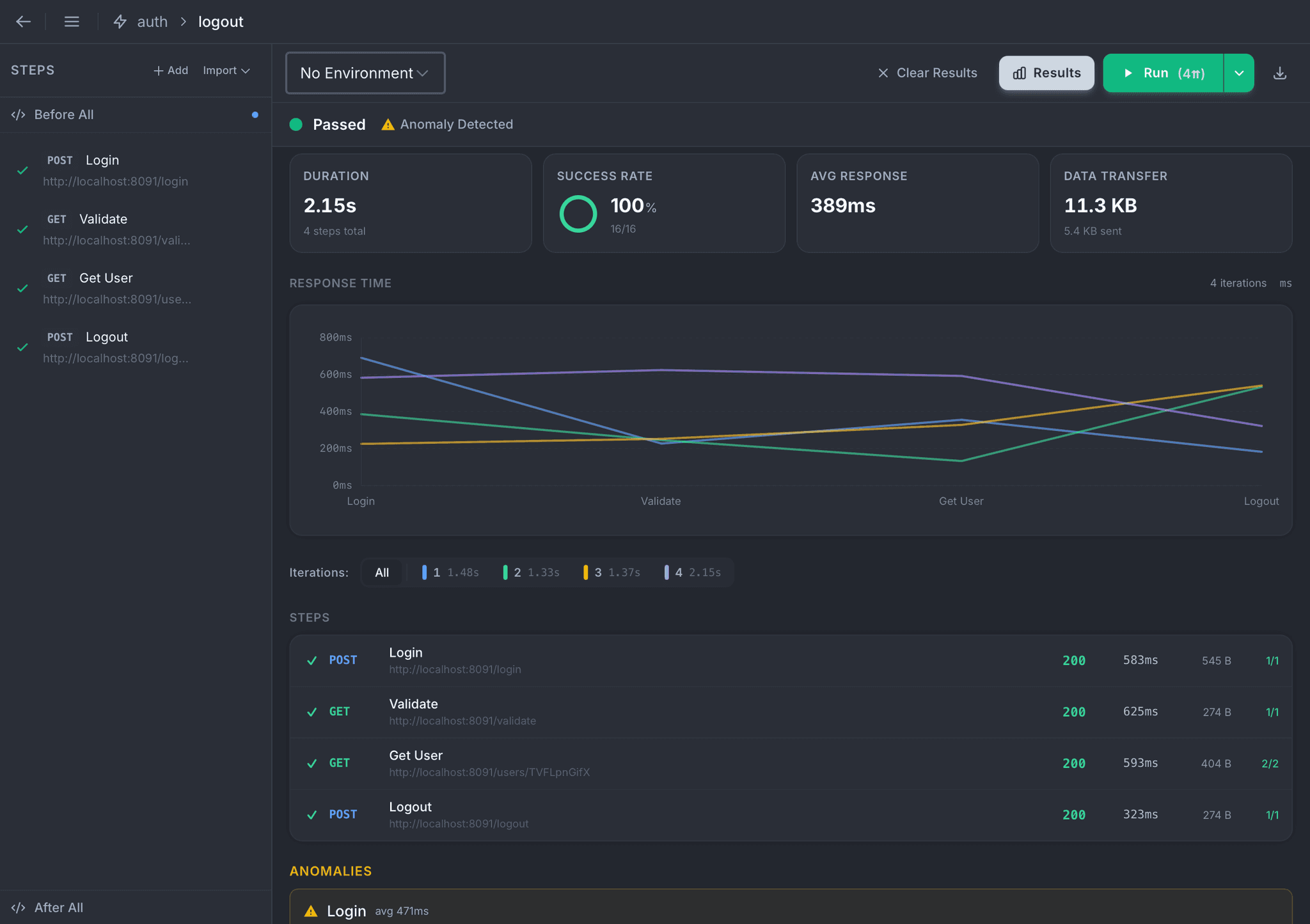
Iterations and Anomaly Detection
Run the flow many times over, sequentially or in parallel, and Atrahasis rolls up every iteration into one view. Response-time curves for each run overlay on the same chart, and outliers or unstable steps are flagged automatically so you see what needs attention without scrolling.
Everything a Request Has, Inside Every Step
A flow step is a full-power request panel, not a simplified form. Anything you can do on a one-off request, you can do inside a step.
Body
JSON, form-data, URL-encoded, raw text, or binary, using the same body editor as the main request panel.
Params & Vars
Query params and in-step variables, all resolving {{variable}}, {{flow.*}}, and {{random.*}} substitutions.
Headers & Auth
Full header editor plus Basic, Bearer, API Key, OAuth 2, and OIDC auth configs.
Processors
Pre-script, post-script, and declarative assertions on every step, with the same at API used everywhere.
Extractions
Lift values out of each response by JSON path, header, regex, or status, then hand them to later steps.
Retry
Per-step retry with fixed or exponential backoff, triggered by network errors, server errors, or rate limits.
Built to Survive Flaky APIs
Real APIs blink. Flow Runner treats retries as a first-class part of the step, not a post-mortem workaround. Configure per-step backoff, pick your triggers, and keep the rest of the flow moving.
Stop-on-failure mode is a single toggle when you need strict ordering.
Retry, Per Step
- Fixed or exponential backoff, with the base delay set once
- Trigger on network errors, 5xx responses, or rate limit (429), each toggleable on its own
- Retry count surfaced in the run results, so you always know what happened
One Flow, Many Runs
The same flow can go wide or deep. Push it through many iterations to see variance, or fan it out in parallel to stress the path end-to-end.
Iterations
Run the flow back-to-back to sample variance and catch intermittent issues. Each iteration shows up on the same chart for instant comparison.
Parallel Workers
Fan the flow out across multiple workers hitting the same path concurrently. Good for smoke tests, race-condition hunting, or warming caches.
Stop on Failure
A single toggle halts the run on the first failure and marks remaining steps as skipped, ideal for strict deployment gates.
Analytics You Actually Read
Charts, totals, per-step timing: signal surfaced, noise collapsed.
- Duration, success rate, average response time, and data transfer on every run
- Response-time chart across steps, for a single run or overlaid iterations
- Per-step table with status, status code, timing, and size
- Bottleneck detection highlights the slowest step in the chain
- Anomaly detection surfaces outlier iterations and unstable steps
- Run history panel keeps recent runs side by side for comparison
Reports You Can Actually Send
Run ends, report is ready. Machine-readable or human-friendly, shipped wherever your team lives.
- JSON output in OpenTelemetry format for observability pipelines
- HTML report with the same layout you see inside the app
- PDF report that is printable, attachable, and archive-ready
- Built from a single call in your After All script
- Ship anywhere: Slack, email API, S3, CI artifact store, anywhere fetch reaches
- One-click Export button from the results panel for ad-hoc downloads
Author on the Desktop, Run Anywhere
Every flow you build in the app runs unchanged on the atra CLI. Exit codes gate your pipeline, the terminal dashboard shows live progress, and the same reports land in your CI/CD artifacts.
See the CLI flow runner guide# Run a flow against staging
atra run auth-flow -f user-journey -e staging
# Ten iterations, back to back
atra run auth-flow -f user-journey -i 10
# Or four workers in parallel (not both at once)
atra run auth-flow -f user-journey -p 4
# Stop on first failure for CI gating
atra run auth-flow -f user-journey -c
Ready to automate your API workflows?
Download Atrahasis and build multi-step flows with one consistent editor.