Test
Five assertion targets, twelve operators, and full JSON Schema contract validation. No test framework, no scripting language, no separate run. Write a check once and it travels with the request into your flows, your load tests, and your pipeline.
No Code Required
Target, operator, expected value. Three dropdowns and a text field, with only the operators that make sense for the target you picked.
Instant Feedback
Assertions run automatically after every request. Each row turns green or red on its own edge, and the panel keeps a passed and failed count.
Bring Your Own Schema
Contract validation works from a schema you paste in, or from the responses you already declared on an OpenAPI endpoint. Either way, no extra tooling.
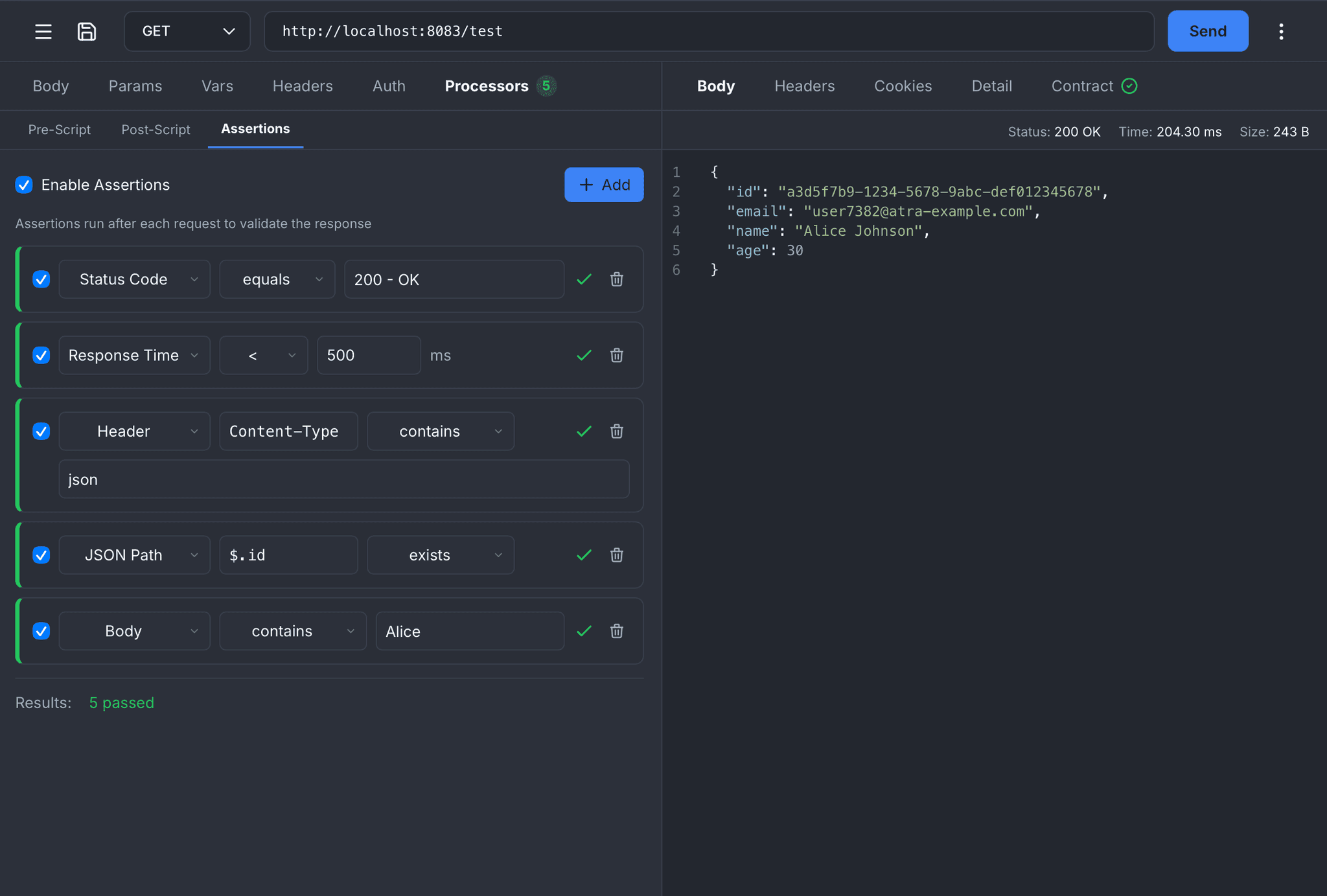
Visual Assertions
Build assertions without writing code. Pick a target, pick an operator, type the expected value. Every assertion runs automatically after each request and shows its own pass or fail state, with a running count at the bottom of the panel.
JSON Path Expressions
Reach deep into a JSON response with full JSONPath syntax. $.id, $.data[0].name, $.items[*].price, filter expressions, all of it. JSON Path is the richest target in the builder: twelve operators, including type checking and emptiness checks that the other targets do not need.
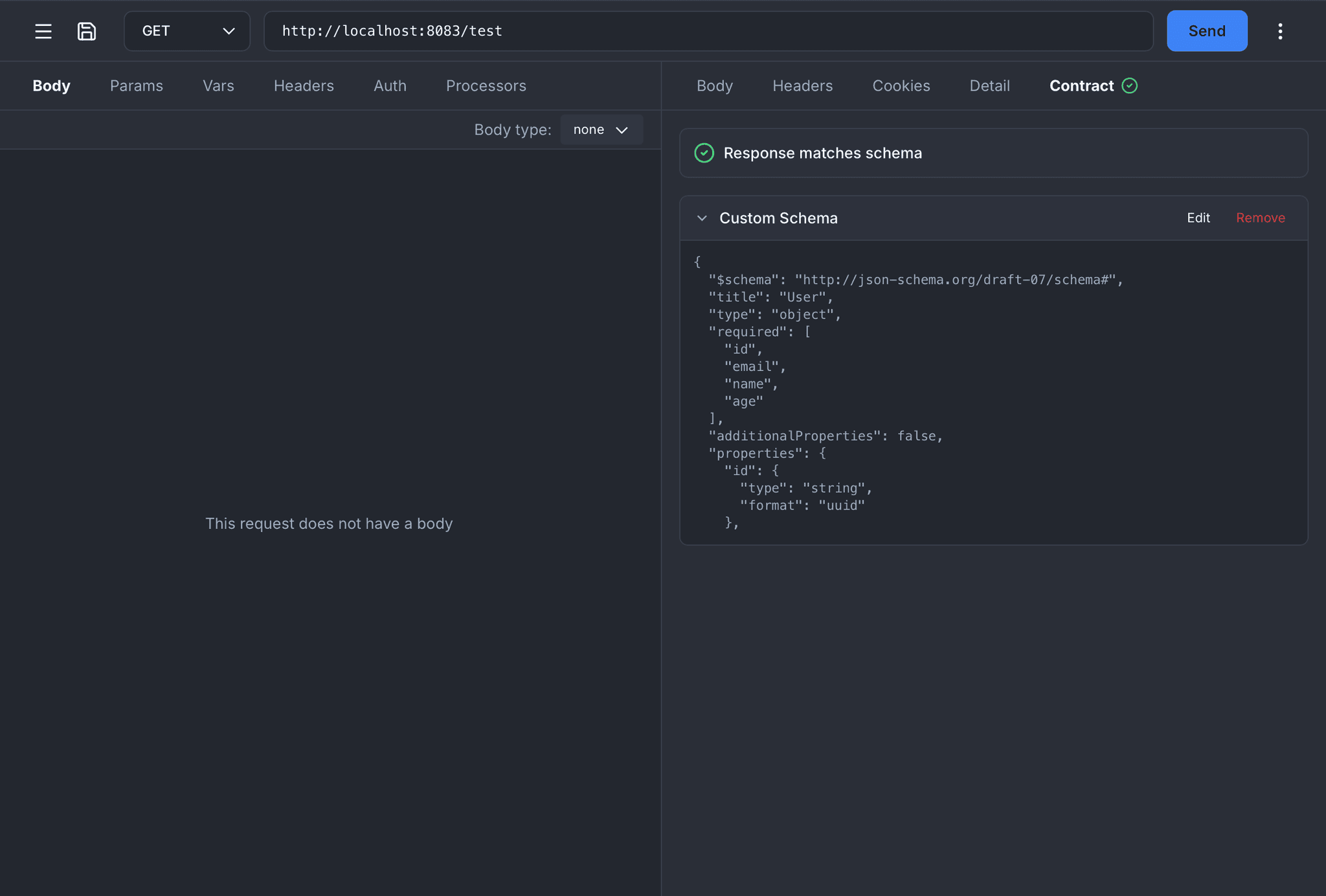
Contract Validation
Validate the whole response shape against JSON Schema instead of one field at a time. Paste or upload your own schema, no OpenAPI required. Structural breakage shows up the moment it appears, not after a consumer files a bug.
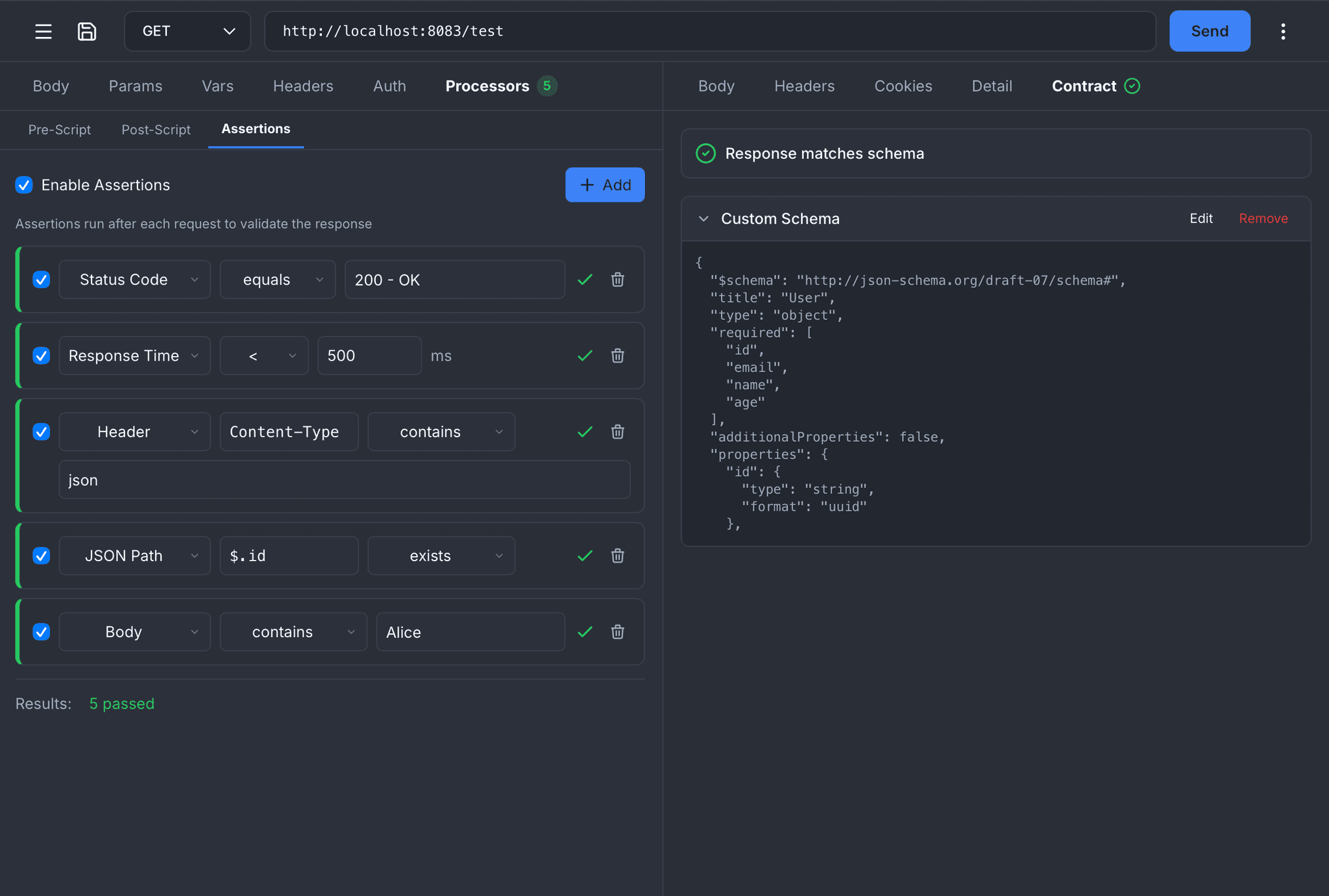
Assertions and Contract Together
The two are not alternatives. Assertions cover business rules and the specific values you care about; contract validation covers structure, types, and formats across the entire body. Both verdicts land in the response panel side by side.
Five Targets, Operators That Fit
The operator list changes with the target. A status code cannot match a regex and a response time cannot be empty, so those options are never offered.
| Target | Available operators |
|---|---|
Status Code Gate on the exact code or a range boundary. The picker lists the standard codes with their names. | equals, not equals, >, < |
Response Time A latency budget on every request, measured in milliseconds. | <, >, equals |
Header Header lookup is case-insensitive, so Content-Type and content-type both resolve. | equals, not equals, contains, not contains, exists, not exists, matches regex |
JSON Path The full set. Twelve operators against any value the path resolves to. | equals, not equals, contains, not contains, exists, not exists, >, <, is empty, is not empty, is type, matches regex |
Body Raw body text, for the cases where the response is not JSON at all. | contains, not contains, equals, is empty, is not empty, matches regex |
Type checking, not just value checking
The is type operator asserts what a JSON value is, not what it equals. Useful when the value changes every run but the shape must not.
stringnumberbooleanarrayobjectnullDetails that stop false failures
- Header names match case-insensitively
- JSON is normalized before comparison, so whitespace differences never fail a check
- Numbers with leading zeros are sanitized before parsing, so a value like 07070 still compares as 7070
- Every assertion has its own enable toggle, so you can park one without deleting it
Contract Validation, Two Ways In
Assertions check the values you thought to check. A contract checks everything else: every field, every type, every format, on every response.
Custom Schema
Paste a JSON Schema into the Contract tab and it validates from the next response onward. No project, no OpenAPI file, nothing to wire up. Works on any request against any API, including one you do not own.
Project Contract
If the request is bound to an endpoint you designed, the responses you already declared become the contract automatically. Schema references resolve against your project components, so shared models are validated too.
The status is one you declared, the content type matches, and the body validates against the schema.
The response came back with a status you never declared, or it only matched your catch-all default entry. Nothing is broken yet, but your contract has a hole in it.
The content type was not one you declared, or the body did not validate. This is the breaking change you wanted to catch.
What the validator actually checks
Errors come back with the exact path, what was expected, and what arrived, so a failure tells you which field moved rather than that something, somewhere, is wrong. Non-JSON responses skip schema validation instead of failing it.
Write the Check Once
The same assertion model runs in four places, with the same operators and the same semantics. Nothing gets rewritten on the way to CI.
Single Request
The Assertions tab sits next to Pre-Script and Post-Script in the Processors panel. Results appear the instant the response lands.
Flow Runner Steps
Every step in a flow carries its own assertion list and its own contract, so a failure points at the exact step that broke.
Load Test Steps
The same assertion list on a load test step, evaluated on every iteration by every virtual user, and rolled into the error breakdown.
atra CLI
Pass assertions inline with -a, or run the flows and specs you already authored. Any failure flips the exit code to 1.
x-atrahasis-assertions extension. Other tools ignore it, and it survives every import, export, and sync.Same Checks, Straight From the Shell
The atra CLI takes assertions inline, evaluates them with the same engine, and turns the result into an exit code your pipeline can read.
# One flag per assertion
atra GET https://api.example.com/orders \
-a "status eq 200" \
-a "response_time lt 500" \
-a "header Content-Type contains json" \
-a "$.data[0].id exists"
# Long form works too
atra GET https://api.example.com/health \
-a "$.status equals ok"
Short aliases
The four comparison operators have shorthands so a check stays readable on one line.
Failures say what arrived
Assertions (3 passed, 1 failed)
  ✓ Status equals 200
  ✓ Response time less_than 500
  ✓ Header 'Content-Type' contains json
  ✗ JSON path '$.data[0].id' exists → Got: (none)
Any failed assertion exits with 1, so a smoke test needs no extra parsing.
Ready to test your APIs?
Download Atrahasis and put a real check on every response you care about.