Reporting
The run ends, the report is ready. Every Flow Runner and Load Test result becomes an HTML dashboard, a PDF archive, or an OpenTelemetry JSON feed, one click from the results panel or one line from an After All script. Send it to humans, reviewers, or your pipeline, no glue code required.
Three Formats, One Click
HTML for the browser, PDF for print and archive, OpenTelemetry JSON for your observability stack. Download any format straight from the results panel. Nothing else to install, nothing to configure.
Shipped From After All
at.export.json(),html(), andpdf() return a ready-to-send report in a single call. Slack, email, S3, CI artifacts: anywhere fetch reaches.
The Whole Run, Nothing Stripped
Every metric you saw in the app lands in the report: percentile latencies, per-step breakdowns, anomaly callouts, threshold verdicts, error analysis. The dashboard you watched is the report you share.
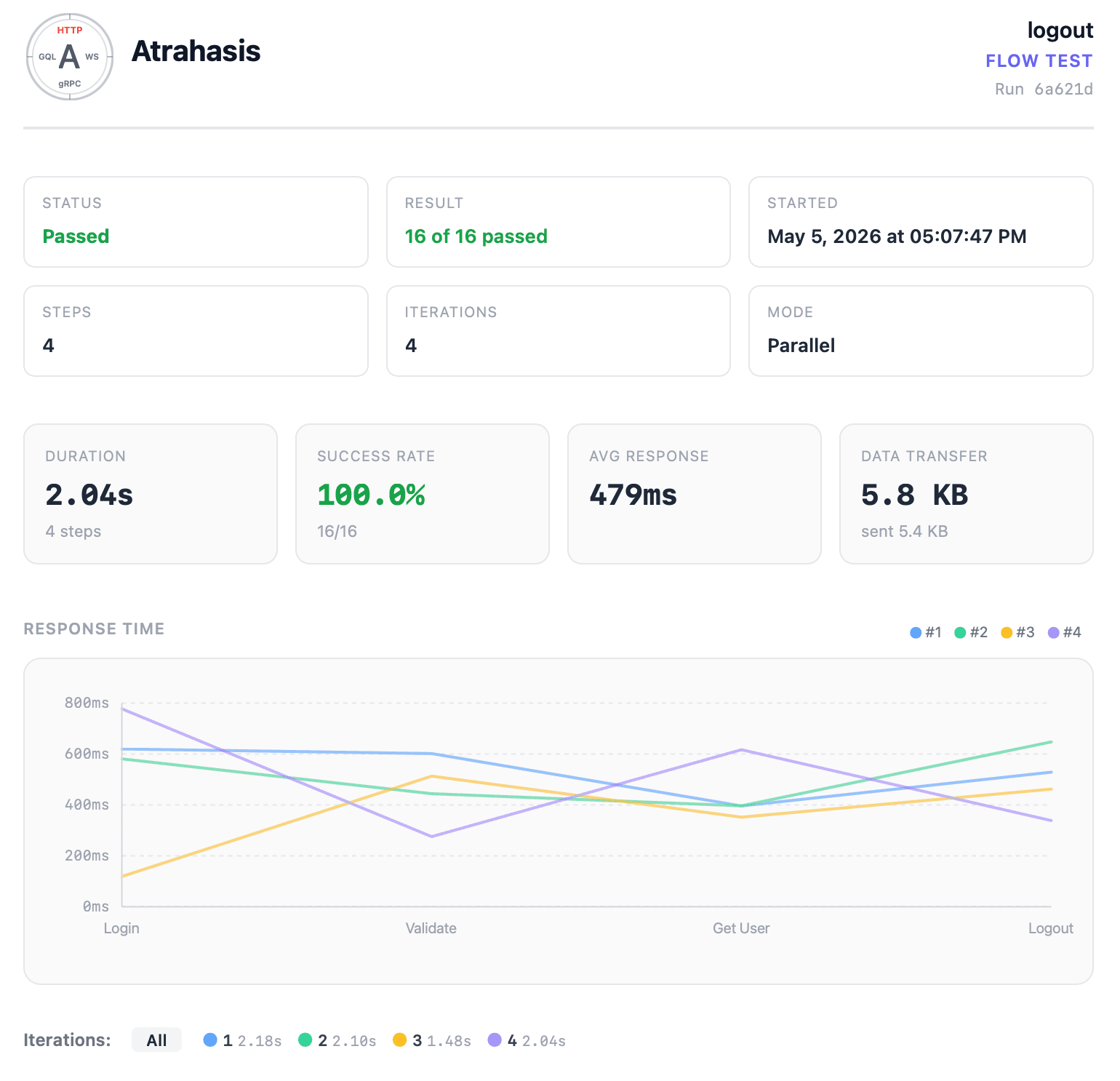
Flow Reports at a Glance
Every Flow Runner run lands as a page you can send. Status, iterations, success rate, duration, and data transfer sit front and center. A response-time chart overlays each iteration, so variance and bottlenecks surface in the first second. No log grepping, no hand-drawn tables.
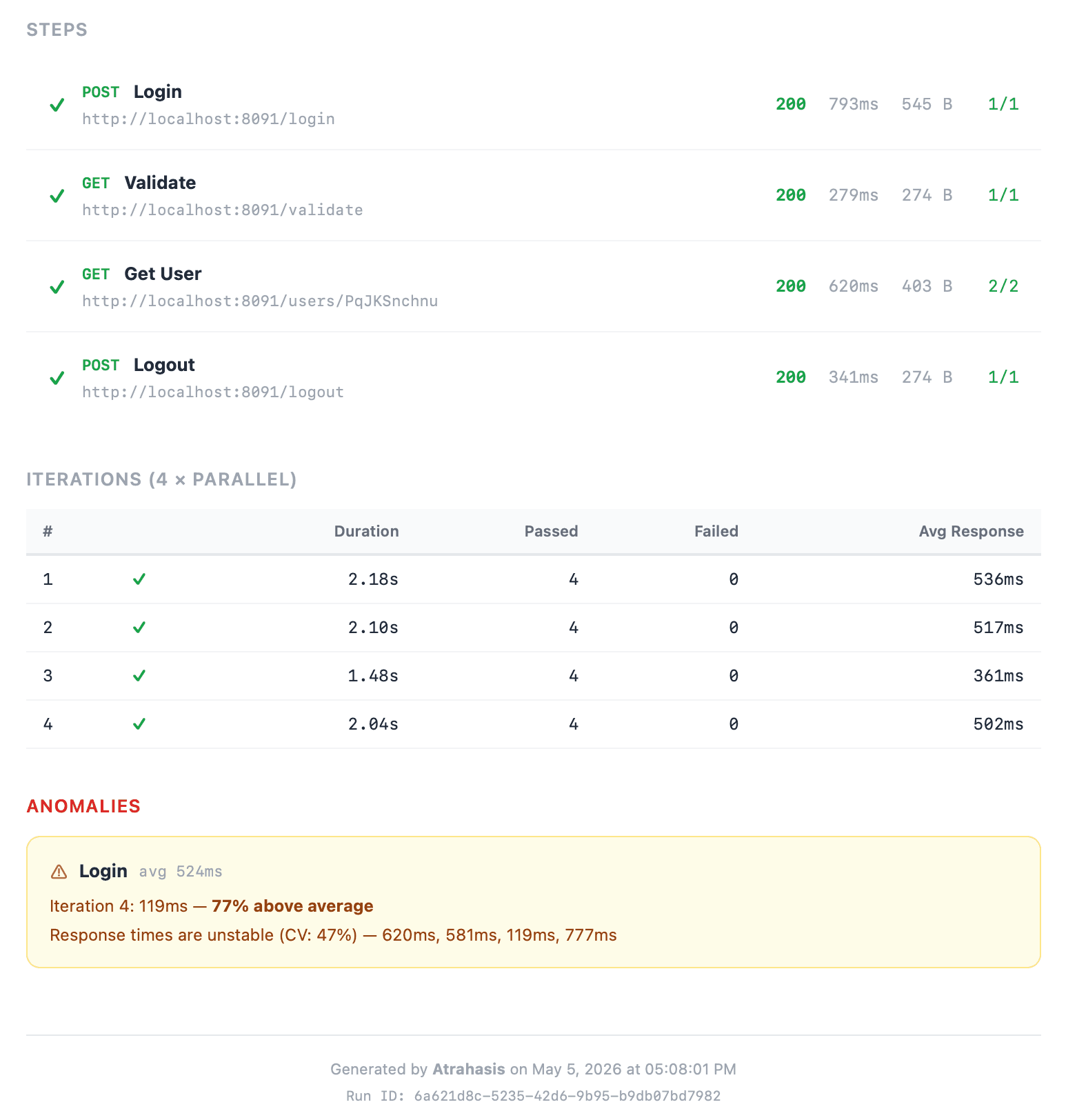
Per-Step Breakdown and Anomalies
Every step in the flow on one line: method, URL, status code, latency, payload size, assertion pass count. An iterations table stacks every run side by side, and anomalies surface outlier iterations and unstable response times without anyone having to eyeball a chart.
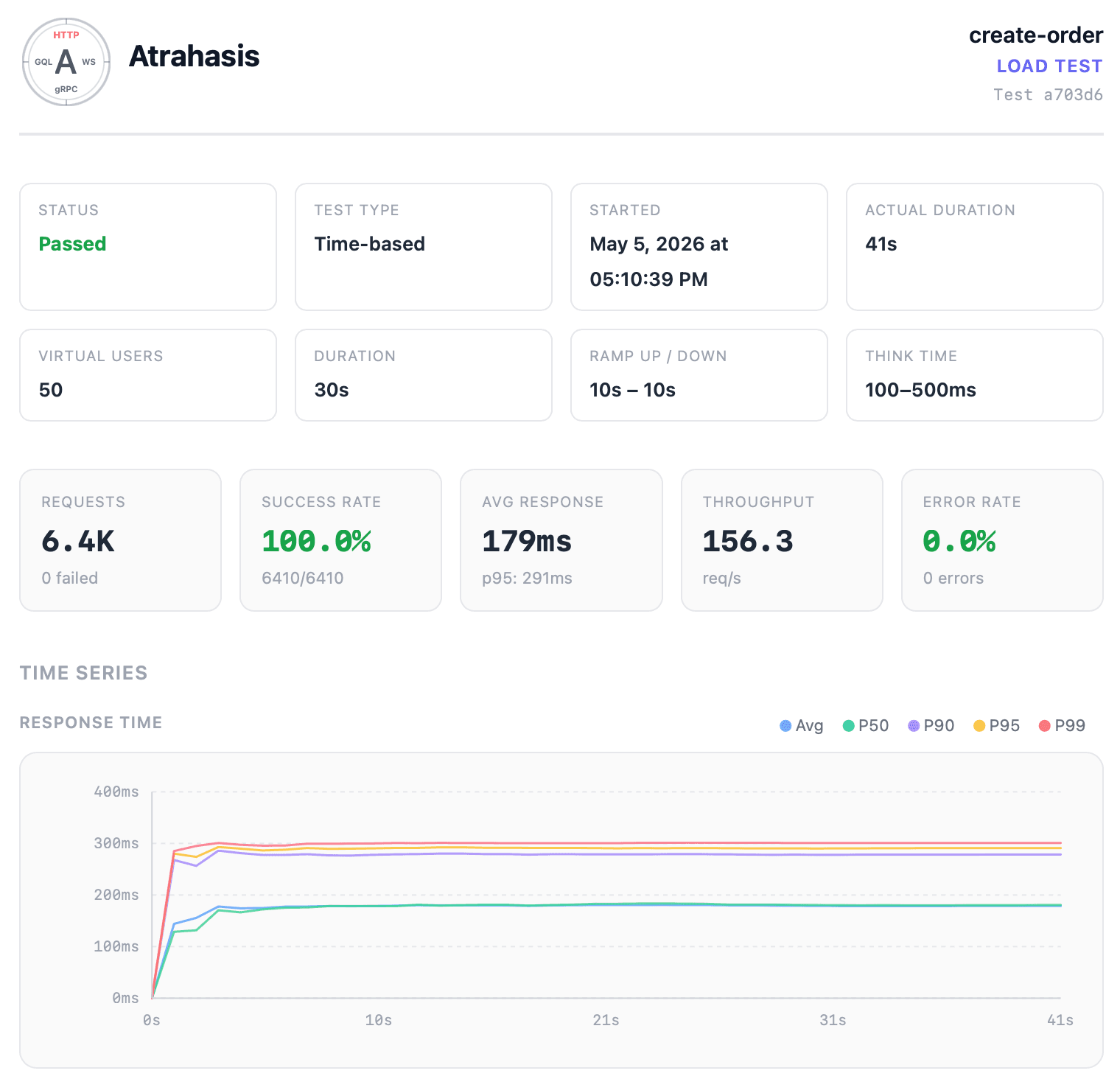
Load Test Dashboards, Frozen in Time
The dashboard you watched during the run becomes your permanent record. Virtual users, ramp periods, think time, request totals, success rate, throughput, error rate: all on one page. The response-time chart traces every percentile from P50 through P99 across the entire run.
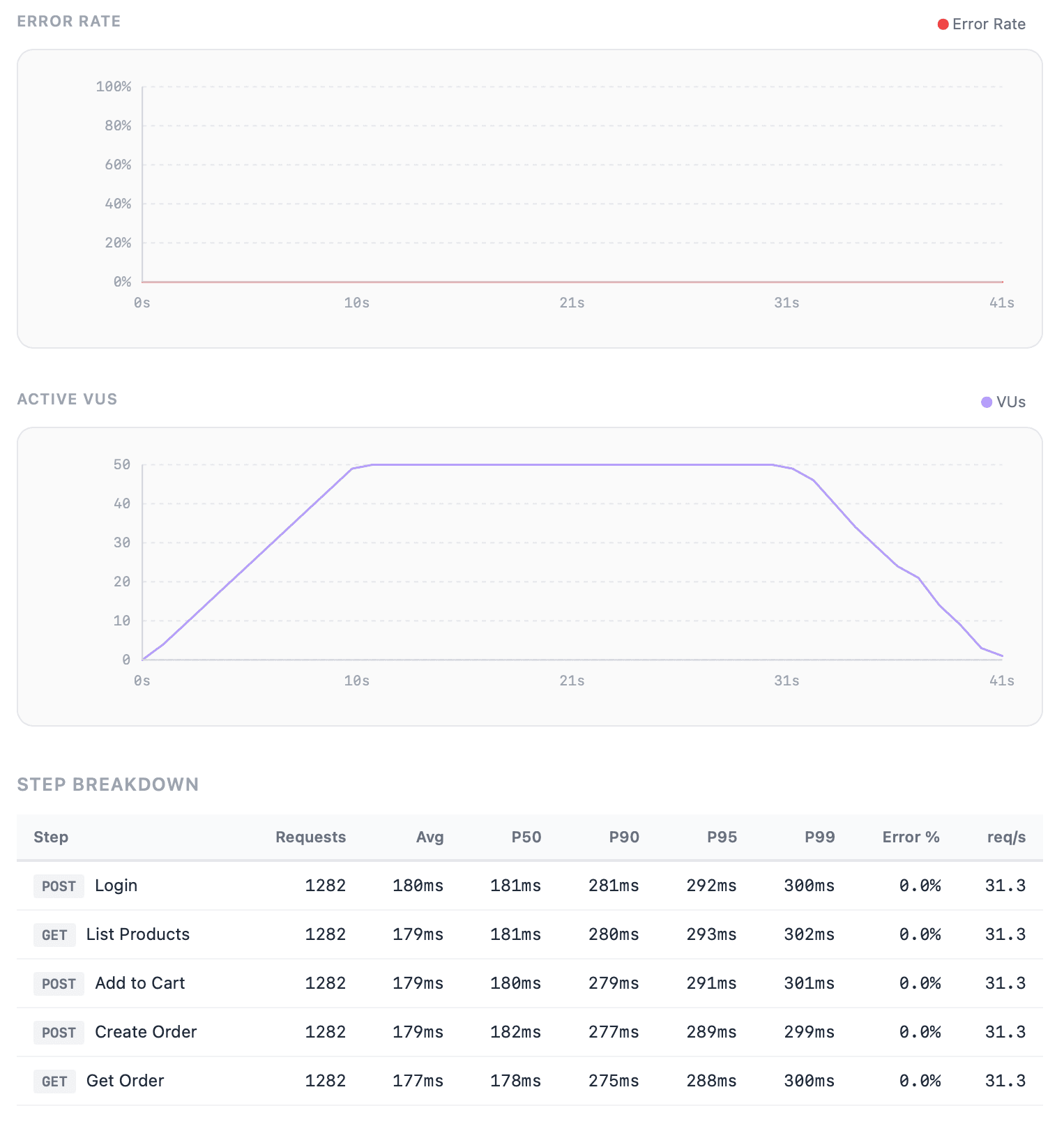
Load Test Details
Everything the live dashboard showed, preserved on one page: error rate over time, virtual-user shape, step-by-step latency and throughput, error breakdowns, threshold verdicts. Scroll the whole run without losing the context you had during it.
Three Formats, One Source of Truth
Same run, same numbers, three envelopes. Pick the one that fits the audience, the format that lands in the right place without a translation step in between.
Open in a Browser
A self-contained file with inline charts and inline styles, no external fetch. Double-click to view in any browser, drop into a Slack message, or link from a portal. Looks exactly like the results panel you watched inside the app.
Print and Archive
Printable and attachable, ready for the inbox or the filing cabinet. Hand it to a reviewer, stamp it as a release artifact, store it with your compliance records. Same layout, fixed page size, nothing that depends on a runtime.
Pipe Into Your Stack
OTLP format, the same shape your observability tooling already reads. Forward it to a collector, ingest it into your metrics backend, trend latency and error rate over time. Machine-readable, schema-standard, pipeline-ready.
Automate from After All
Click-to-download is great when you want to eyeball a run. When you want the report in Slack before your coffee cools,at.exportdoes it in a few lines.
at.export.html()Returns the full HTML report as a string. Drop it straight into an email body, a Slack rich message, or a PUT upload.
at.export.pdf()Returns the rendered PDF as bytes. Perfect for S3 uploads, email attachments, or archive drops.
at.export.json()Returns the run as OpenTelemetry OTLP JSON. Forward it to a collector, or inspect it with any JSON tool you already use.
const pdf = await at.export.pdf();
const json = at.export.json();
// Notify the team in Slack
await fetch(at.environment.get("SLACK_WEBHOOK"), {
method: "POST",
headers: { "Content-Type": "application/json" },
body: JSON.stringify({ text: "Load test finished ✓" }),
});
// Archive the PDF to object storage
await fetch(at.environment.get("S3_UPLOAD_URL"), {
method: "PUT",
body: pdf,
});
// Forward metrics to the OTel collector
await fetch(at.environment.get("OTEL_ENDPOINT"), {
method: "POST",
headers: { "Content-Type": "application/json" },
body: json,
});
The same at API lives in Flow Runner and Load Test. Write the After All once and run it everywhere: desktop, CLI, CI/CD pipeline.
Every Metric, Every Report
The numbers you make decisions on belong in the report. The dashboard you watched and the document you share are the same view, with nothing pruned and nothing summarized to death.
Flow Runner Reports
End-to-end journeys, iterations, anomalies, extracted variables: every fact the run produced.
- Status, pass/fail counts, and iteration breakdown
- Duration, average response time, and data transfer totals
- Response-time chart overlaid across every iteration
- Per-step method, URL, status code, latency, payload size, assertion counts
- Iterations table with execution mode and per-run timing
- Anomaly callouts for outlier iterations and unstable steps
- Failed step errors surfaced in-line
- Extracted variables captured during the run
Load Test Reports
Percentile latencies, throughput, error rates, thresholds: the pressure profile of every run, preserved.
- Status, test type, ramp periods, and think time configuration
- Total requests, success rate, throughput, and error rate
- Percentile latencies from P50 through P99, plus average and min/max
- Response-time, error-rate, and active-VU time series
- Per-step breakdown with percentile latencies and error rates
- Error breakdown by category and cross-step error analysis
- Threshold verdicts with actual vs. expected values
- Virtual-user count, ramp-up/down, and iteration settings
Ship It Wherever Your Team Lives
A report that stays on disk is a report nobody reads. Atrahasis hands you the content; After All hands it to anyone who needs it.
Chat Channels
POST a summary or the full HTML to a Slack, Discord, or Teams incoming webhook. Every failed run becomes a message, every green run a quiet confirmation.
Hand the HTML body straight to Resend, SendGrid, Mailgun, or Postmark. Scheduled digests, on-failure alerts, or a stakeholder ping, with no extra tooling.
Object Storage
PUT the PDF or HTML to S3, GCS, or Azure Blob and link the URL anywhere you like. Build a permanent archive of every release candidate.
CI Artifacts
Write the report next to the test run in your pipeline. Reviewers click straight from the PR or build dashboard into the exact run that ran.
Observability Stacks
Forward the OpenTelemetry JSON to any OTLP collector. Trend latency, throughput, and error rate alongside the metrics your backend is already emitting.
Your Own Endpoint
Anywhere fetch reaches. Internal review apps, audit systems, compliance pipelines: if it speaks HTTP, you can hand it an Atrahasis report.
Same Report, Desktop to Pipeline
Every After All script you write in the app runs unchanged on the atra CLI. The same HTML, the same PDF, the same structured JSON, authored on your desktop and shipped from CI. One source of truth, zero drift between what your team reviews and what the pipeline emits.
See the atra CLIReady to ship reports that get read?
Download Atrahasis and turn every run into a document your team, or your pipeline, can act on.