Environments & Secrets
One set of variables for every stage (dev, test, stage, prod) and the credentials behind them never hit disk. Mark a value secret, point it at a Vault path, or let the auth tabs strip plain-text for you. Flow and Load Test files stay git-safe; the CLI and CI/CD pull the exact same references from the shell.
Per-Environment Values
One variable name, one value per environment. Switch with a single toggle and every step in every flow and load test resolves against the active set. No rewriting, no duplicate specs.
Secrets in the OS Keychain
Flip a checkbox and the value goes straight to macOS Keychain, Windows Credential Manager, or Linux Secret Service. Nothing on disk, nothing in git, nothing for anyone to stumble onto in a shared repo.
HashiCorp Vault Integration
Point a variable at a Vault path and the value pulls fresh at request time. Sessions live in the keychain, connections are portable across your team, nothing about the secret ever hits your disk.
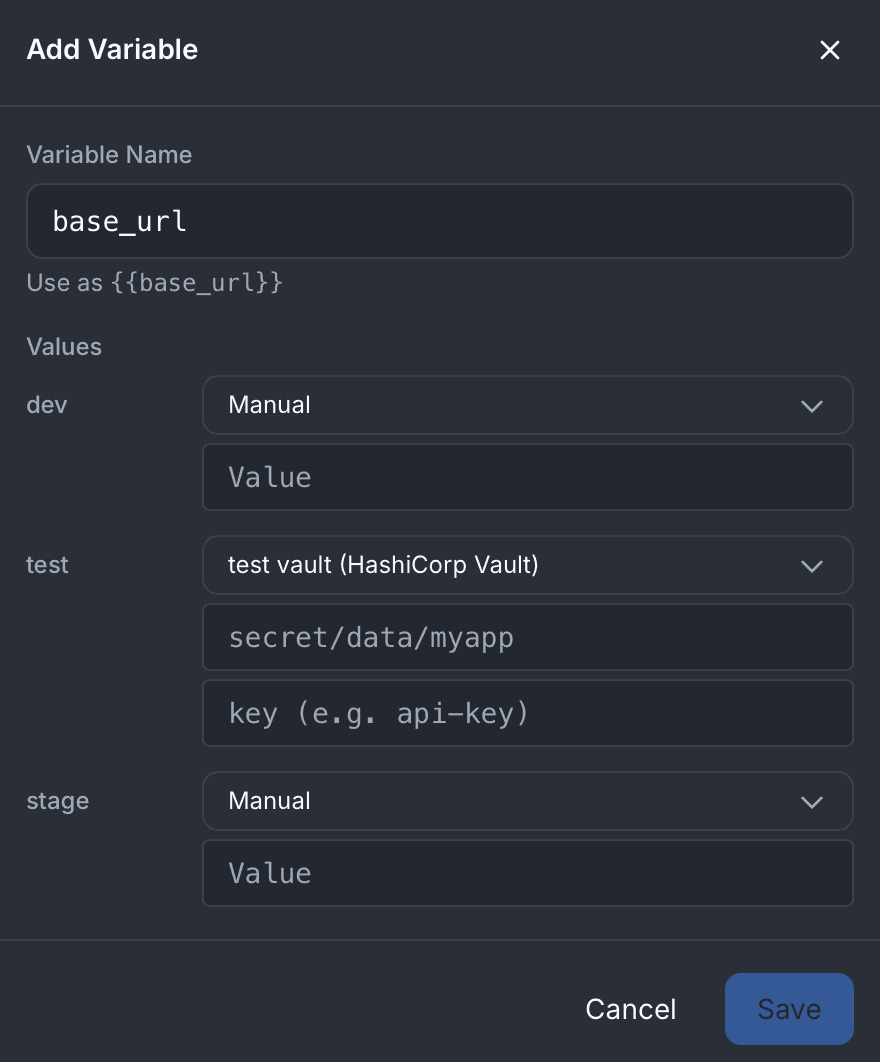
One Variable, Every Environment
Define a variable once and give it a different value for each environment: dev, test, stage, prod. Some pulled from Vault, some stored as OS keychain secrets, some plain-text where plain-text is safe. The active environment decides which value lands in your requests; everything else stays one toggle away.
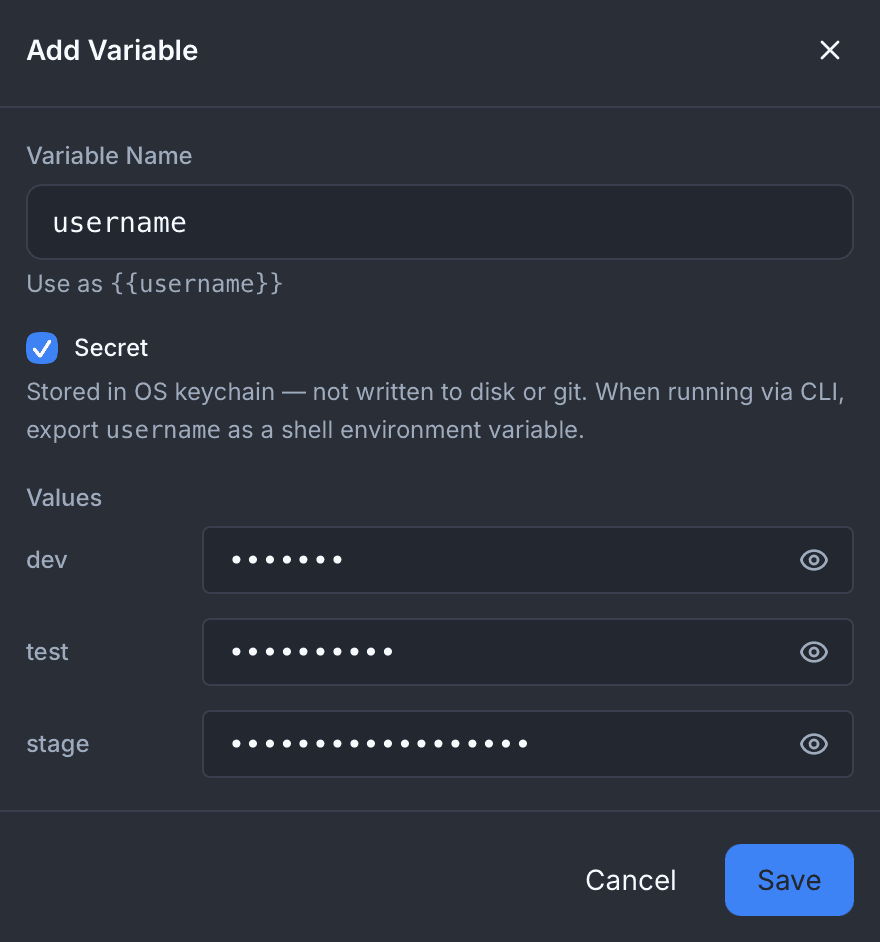
Secrets Never Hit Disk
Check the Secret box and the value lives in the OS keychain, whether that is macOS Keychain, Windows Credential Manager, or the Linux Secret Service. Not in JSON, not in git. The environments file keeps the shape; the value stays on the machine. Folder renames migrate the keychain entries for you; folder deletes tear them down.
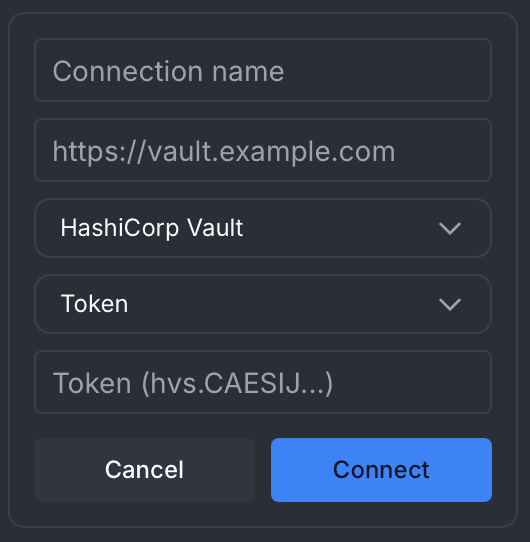
Connect Your Vault
Point Atrahasis at a HashiCorp Vault server, pick token or userpass auth, and you are live. Connection metadata and session tokens live in the OS keychain. Every variable sourced from Vault pulls fresh at request time: nothing cached, nothing persisted, nothing in git.
Credentials, Safe by Default
Flow Runner and Load Test auth tabs refuse to persist plain-text. Paste a password, a bearer token, or an API key and save, and the value is stripped before the file touches disk. Your spec stays git-safe without you remembering to sanitize it.
Plain-text: stripped on save
Values like these never make it to the JSON on disk. The structure is kept; the secret is dropped.
References: safe to persist
Use {{ENV_VAR}} or {{flow.var}}. Mark the variable secret or pull it from Vault. CLI and CI/CD resolve these the same way.
Two Variable Syntaxes, One Mental Model
Environment variables live across runs. Flow variables live inside one. Know which is which and every value ends up in the right place.
{{varName}}Defined in the variable editor, switched with the environment toggle, resolved against the active environment. Best for base URLs, regional endpoints, tenant IDs, feature flags, and API keys: anything you want managed per environment and optionally sourced from the OS keychain or Vault.
{{flow.varName}}Set by pre-script, post-script, or response extraction during a run. Lives only for that run, isolated per virtual user in load tests. Best for auth tokens captured from a login response, IDs carried forward to the next step, and anything the previous request just produced.
Same References, Different Machines
Authoring happens on the desktop, where the OS keychain holds your secrets. Running happens anywhere: a developer terminal, a container, a CI job. The CLI reads the same {{varName}} and{{flow.varName}} references from the shell.
No desktop-only flows, no CI-only specs. One file travels from laptop to pipeline.
Parity, Field by Field
- Variable marked secret on desktop → export it as a shell env var when running on the CLI
- Vault connection named "prod-vault" on desktop → set VAULT_AUTH_PROD_VAULT as a token in CI
- {{varName}} and {{flow.varName}} references resolve the same way on both sides
- Same flow, same load test, same spec files, with no desktop-only or CI-only branches
- Plain-text never travels with the spec; the shell or the keychain supplies it at run time
export VAULT_AUTH_PROD_VAULT="$CI_SECRET_VAULT_TOKEN"
# Same spec the team authored on the desktop, no rewrite
atra run auth-flow -f user-journey -e prod
Ready to ship credentials without shipping them?
Download Atrahasis and keep every credential off disk, out of git, and in the one place it belongs.