Automate
Script anywhere a request runs. One consistent at API across Pre-Script, Post-Script, Before All, and After All, in both the Flow Runner and the Load Test module. Real JavaScript, real fetch, real reports. No proprietary DSL.
Four Scripting Points
Pre-Script, Post-Script, Before All, After All, all on one at API with the same semantics everywhere. Flow Runner and Load Test share the exact same surface.
Real JavaScript
Top-level await, fetch routed through the app backend (no CORS), JSON.parse, and in flow and request scripts the full browser surface: Web Crypto, URL, TextEncoder. Nothing stripped, nothing faked.
Reports Built In
at.export gives you the run as JSON, HTML, or PDF in one call. Ship reports to S3, Slack, email, or your CI pipeline without a single line of glue code.
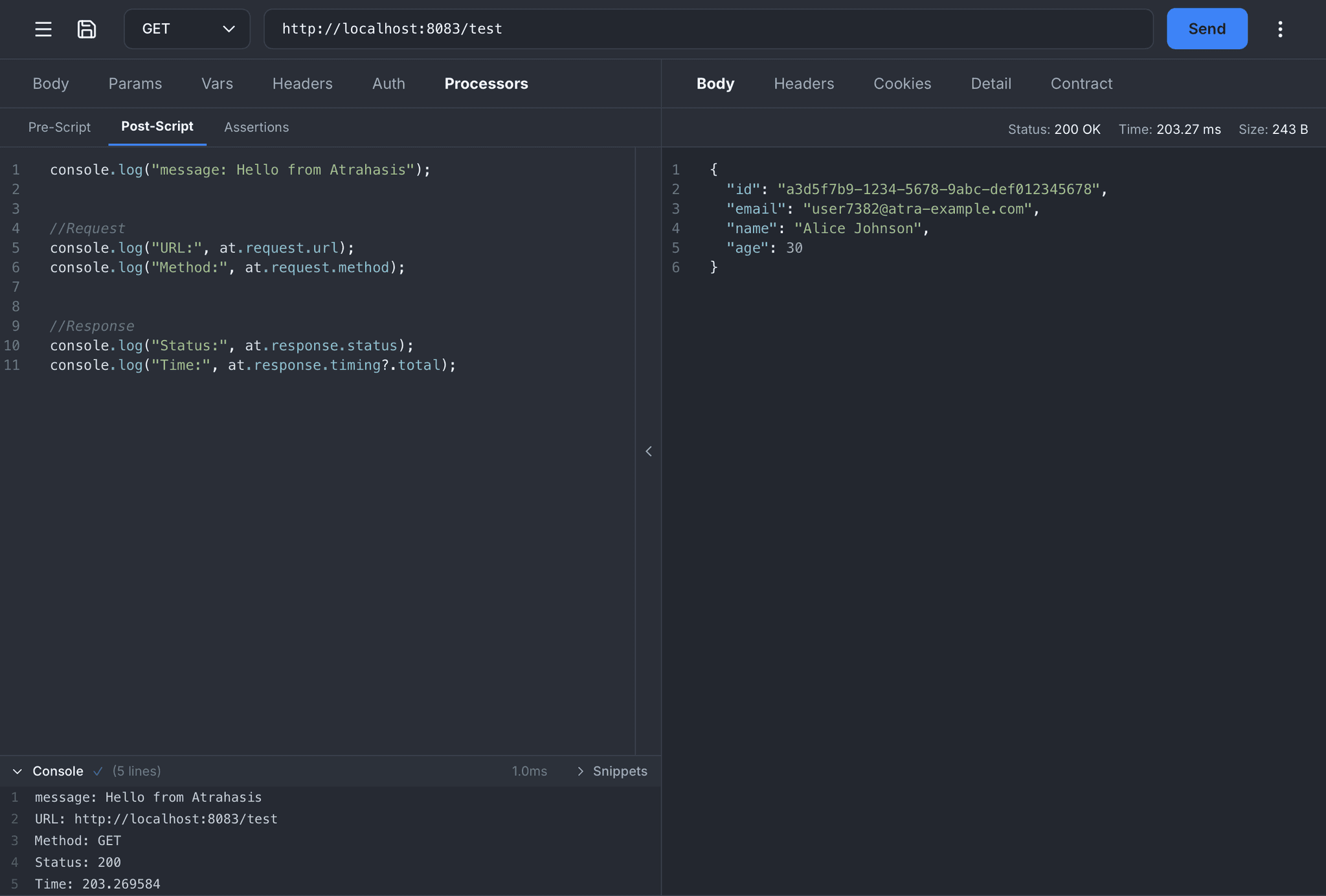
Pre-Script
Run JavaScript just before a request fires. Inject dynamic tokens, add a correlation ID, pull a fresh OAuth token from another endpoint, or validate the outgoing payload. Mutate the URL, headers, and body through at.request and your changes flow into the real request.
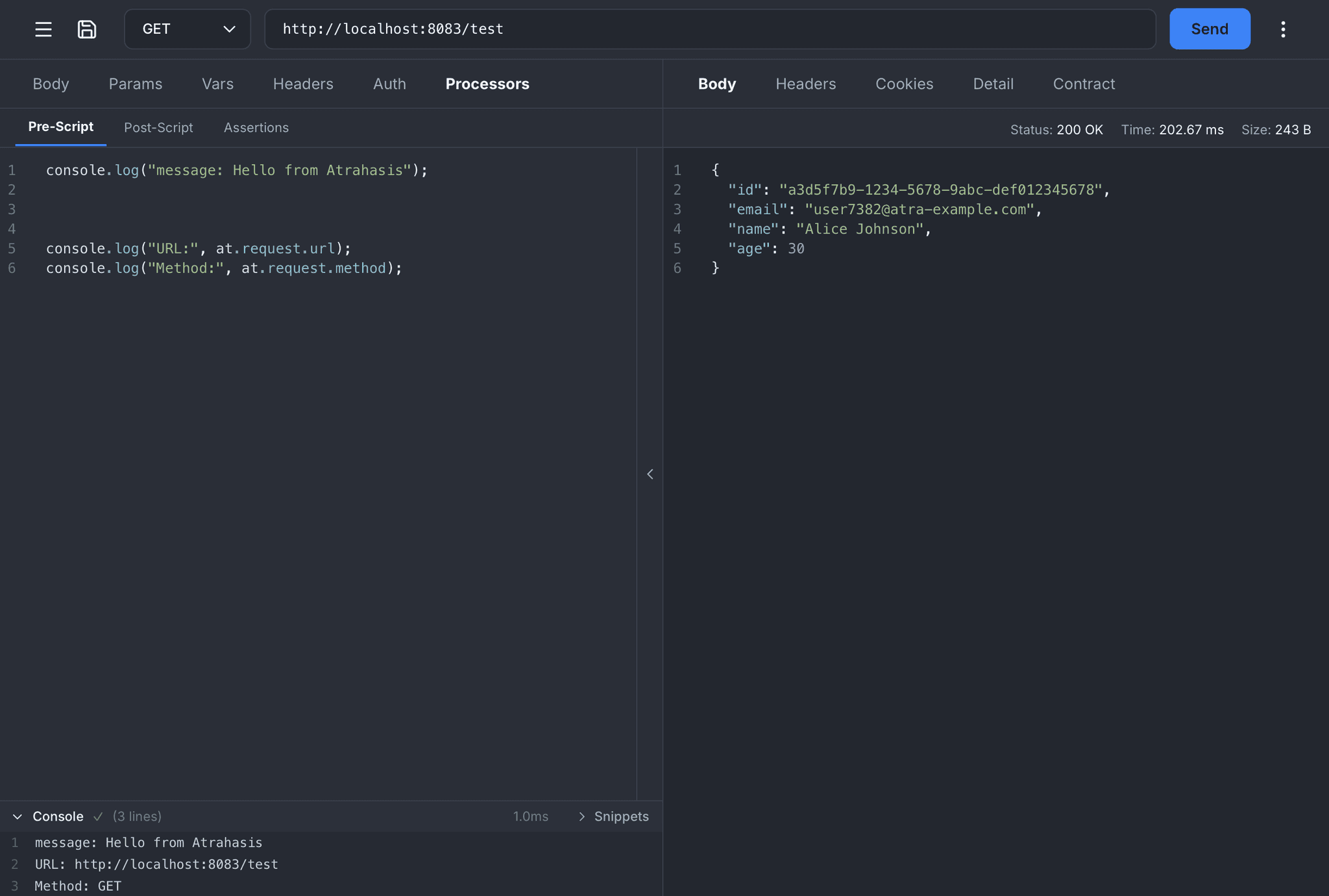
Post-Script
Read the response the moment it lands. Parse JSON with at.response.json(), extract values into environment variables, inspect timing breakdowns, forward a copy to a webhook, or chain results into the next step. Full request and response context, both available in one place.
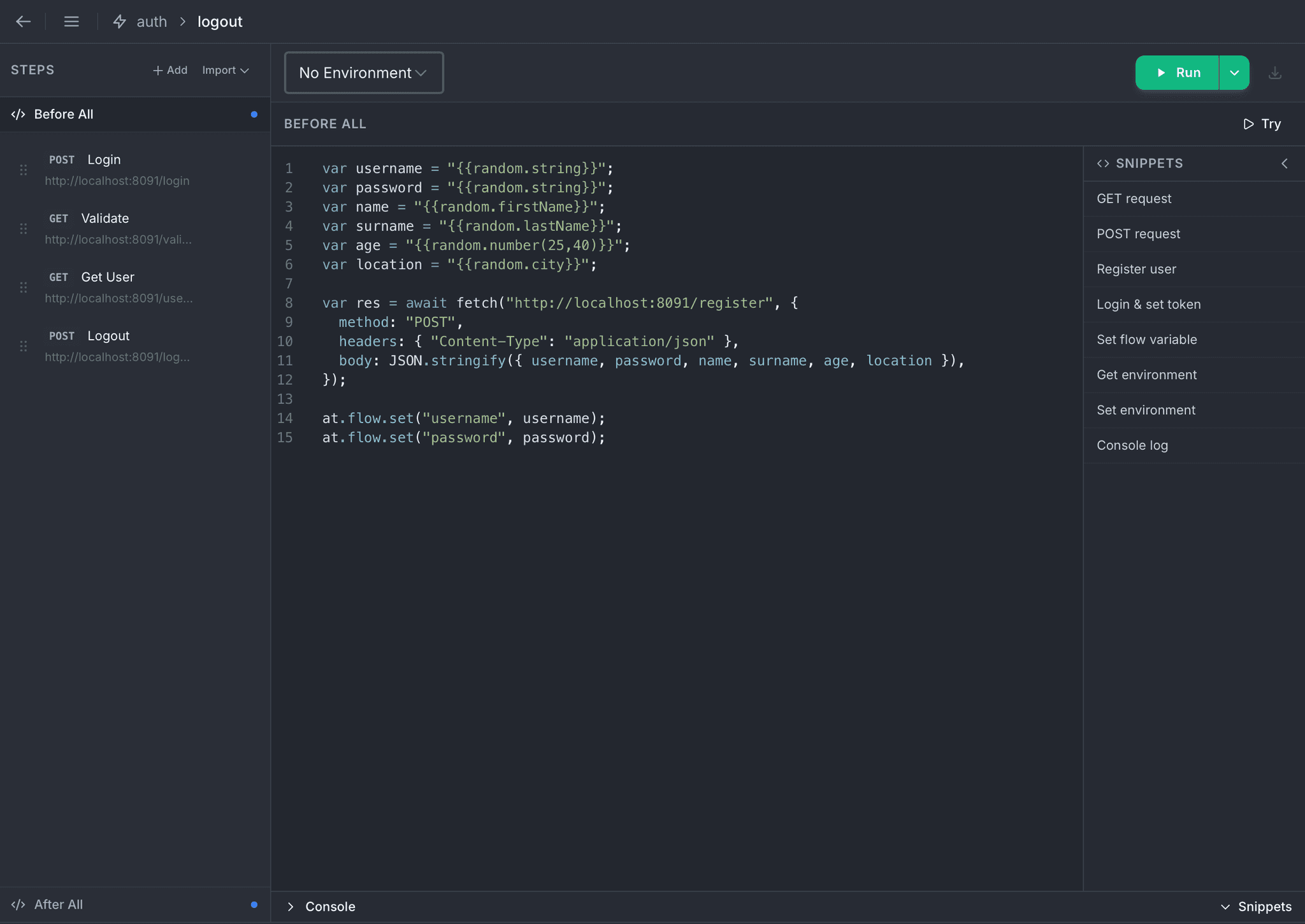
Before All
One-time setup before the first step runs. Register a test user, seed a database, fetch a one-shot token, or prepare flow variables every step will consume. The same hook lives in Flow Runner and Load Test, with an identical API and identical semantics.
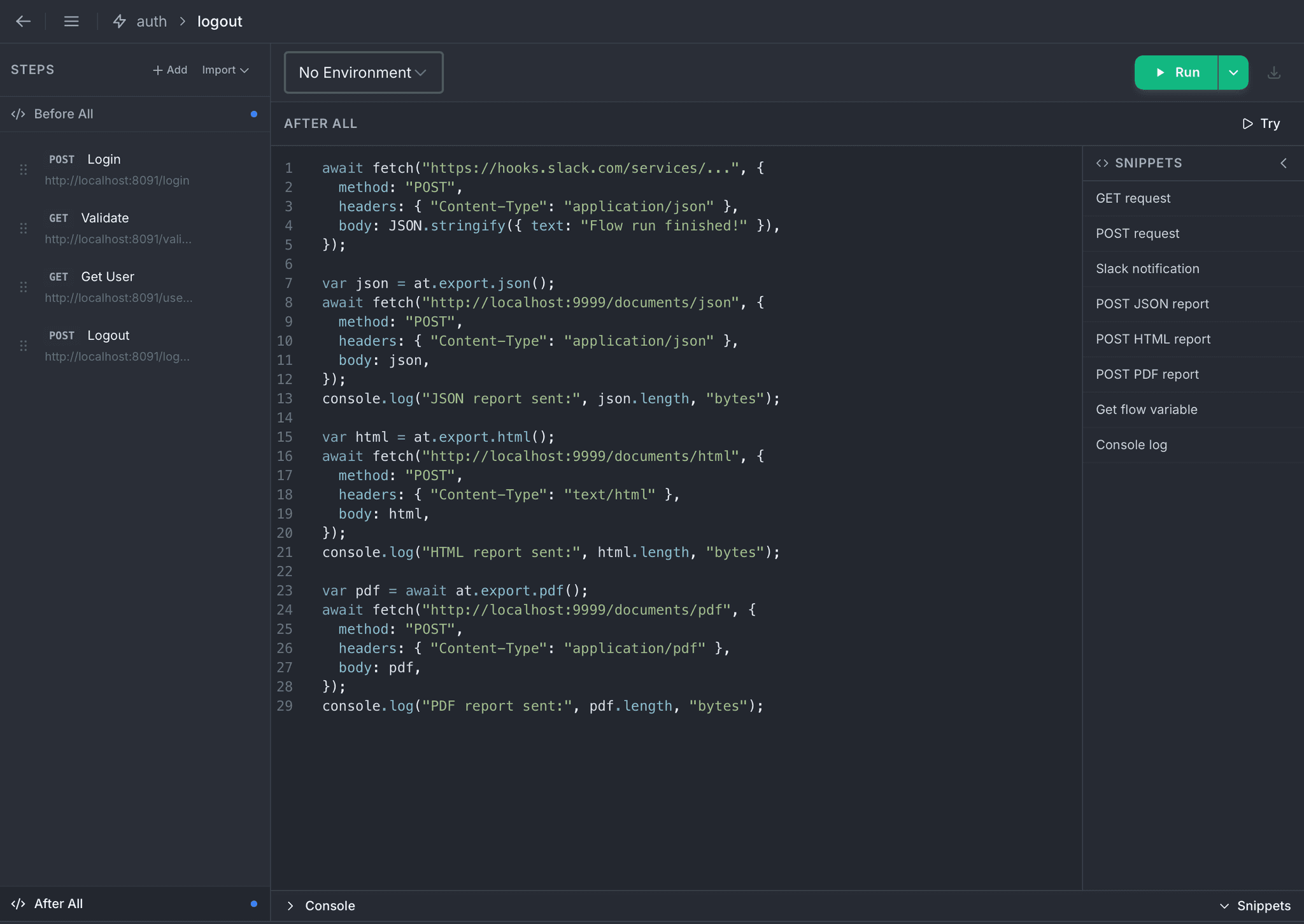
After All
Close the loop when the run finishes. at.export gives you the entire run as JSON, HTML, or PDF in a single call, ready to POST to your storage, attach to an email, or ship to your CI pipeline. Slack notifications, team alerts, cleanup: all from a single script.
The at Object
Every script gets a single global called at, grouped into five focused namespaces. Nothing else to import, nothing to configure.
at.environmentRead and write environment variables. Writes persist to the active environment as each script finishes. In a load test every virtual user reads its own copy, so a write is not visible to the other VUs mid-run.
get(key)set(key, value)has(key)at.flowPass data between steps without touching disk. Per-virtual-user isolation in load tests.
get(key)set(key, value)has(key)at.requestInspect the outgoing request. Mutate URL, headers, and body inside Pre-Script. Read-only in Post-Script.
urlmethodheadersbodysetHeader()removeHeader()at.responseParse the response body with a cached json() helper and inspect timing breakdowns. Available in Post-Script.
statusstatusTextheadersbodyjson()timingat.exportBuild a ready-to-send report of the run as JSON, HTML, or PDF. Available only in After All.
json()html()pdf()What You Can Automate
A few of the patterns teams reach for on day one. Everything runs inside the app: no external worker, no extra service to deploy.
Carry data across requests
Lift any value out of a response (IDs, tokens, headers, nested JSON fields) and drop it straight into the next request's URL, headers, or body. No manual copy-paste, no hardcoded fixtures.
Chain requests via flow variables
Extract an ID from a POST response in Post-Script, save it to at.flow, and reference it in the next step's URL. Zero manual copy-paste.
Seed and teardown test data
Register a fresh user in Before All with random data, run your flow against it, then clean up in After All, so every run starts from a known state.
Slack / Discord / Teams alerts
POST a summary to any incoming webhook from After All. Attach assertion counts, timing percentiles, or a deep link to the report.
CI/CD-ready run reports
at.export.json() returns the whole run as structured JSON. at.export.html() renders a full report. at.export.pdf() returns bytes ready to upload to S3, GCS, or anywhere else.
Email summaries via provider APIs
Call Resend, SendGrid, Mailgun, or Postmark with at.export.html() as the email body, delivering a full HTML run report on every failure or schedule.
Built for Real Work
Sensible defaults, hard limits, and zero surprises. Your scripts stay out of trouble so your runs stay green.
Globals Available
at, console, and fetch are there in every script. The rest come with flow and request scripts, which run on the full browser runtime.
fetch, CORS-free, routed through the app HTTP backendconsolewith log / info / warn / errorcryptowith randomUUID, getRandomValues, and subtle for HMAC / signing- Top-level
await, setTimeout, URL, TextEncoder, atob / btoa
Safety & Performance
- 30-second wall-clock timeout on every script, so nothing hangs
- Sandboxed execution with no filesystem access and no surprises
- Load Test step scripts run on a dedicated high-throughput engine tuned for thousands of virtual users in parallel
- Try button runs any script on demand, so you can preview logs before a real run
Desktop to Terminal, Same Scripts
Every script you write in Atrahasis Pro runs unchanged on the atra CLI. One flow definition, one spec file, authored on your desktop and executed in CI, a container, or a developer's terminal.
Full Parity, No Rewrites
- Same
at.environment,at.flow,at.request,at.response,at.exportAPI surface - Same Before All / After All / Pre-Script / Post-Script hooks
- Exit codes (0 pass / 1 fail) to gate deployments from your pipeline
- Real-time TUI dashboard with live charts, error breakdown, and anomaly detection
- Five test types built-in: load, stress, spike, soak, custom
- HashiCorp Vault integration via
VAULT_AUTHfor secret injection - HTML, PDF, and JSON reports, the same output whether you run on the desktop or in a terminal
# Run a flow with 5 parallel workers on staging
atra run auth-flow -f user-journey -e staging -p 5
# Stress test a spec, gate CI on exit code
atra run specs -s checkout-api -t stress -e prod
# Stop the flow on first failure
atra run auth-flow -f user-journey -c
# Source secrets from HashiCorp Vault
VAULT_AUTH="hvs.token@http://vault:8200" \
atra run specs -s checkout-api -e prod
Ready to automate your workflows?
Download Atrahasis and extend every request, flow, and load test with JavaScript.